implement collaborative doc system (outline)

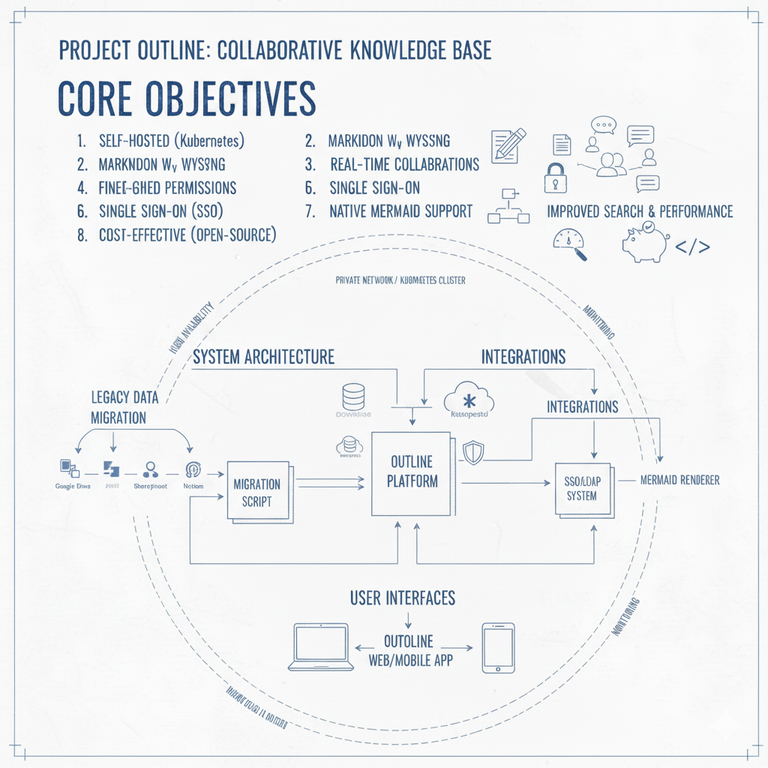
Objective / 目標:
To unify the company's fragmented documentation platforms (Google Docs, SharePoint) into a single, centralized knowledge base. 將公司碎片化的文件平台(Google Docs、SharePoint)統一為單一、集中的知識庫。
Challenges (Before) / 挑戰(轉型前):
- Information Silos: Team documents were scattered across Google Docs and SharePoint, making them difficult to manage and access.
- 資訊孤島:團隊文件散佈在 Google Docs 和 SharePoint 中,導致管理與存取困難。
- Google Drive: Excellent for collaborative documents (Docs, Sheets, Slides) but lacked support for other file types and structured knowledge.
- Google Drive:非常適合協作文件(Docs、Sheets、Slides),但缺乏對其他文件類型和結構化知識的支持。
- SharePoint: Supported a wide range of file types but offered a subpar editing experience and an inefficient, unreliable search function.
- SharePoint:支持多種文件類型,但編輯體驗不佳,且搜尋功能效率低且不可靠。
- Common Limitation: Neither platform provided native support for technical diagrams (e.g., flowcharts, architecture diagrams).
- 共同限制:兩個平台都不提供對技術圖表(例如流程圖、架構圖)的原生支持。
Solution (After) / 解決方案(轉型後):
- System Deployment: We self-hosted the open-source knowledge base, Outline, on our internal Kubernetes (K8s) cluster.
- 系統部署:我們在內部的 Kubernetes (K8s) 叢集上自行託管了開源知識庫 Outline。
- Data Migration: We developed a script to convert and import existing documents from legacy platforms into the new system.
- 數據遷移:我們開發了一個腳本,將現有文件從舊平台轉換並導入新系統。
Results & Achievements / 結果與成就:
- Security & Access Control: Full support for Single Sign-On (SSO) and granular permission controls.
- 安全與存取控制:完全支持單一登入 (SSO) 和細粒度的權限控制。
- Enhanced Productivity: Native support for Markdown and Mermaid, enabling technical teams to write documentation and create diagrams efficiently.
- 提高生產力:原生支持 Markdown 和 Mermaid,使技術團隊能夠高效地撰寫文件和建立圖表。
- Real-time Collaboration: Features collaborative editing and a commenting system to streamline teamwork and feedback.
- 即時協作:具備協作編輯和評論系統,以簡化團隊合作和回饋流程。
- Version Control: Built-in version history for all documents, allowing for easy tracking of changes and rollbacks.
- 版本控制:所有文件內建版本歷史記錄,方便追蹤更改和回滾。
- Powerful Search: A highly accurate, full-text search engine that significantly reduces the time needed to find information.
- 強大的搜尋功能:高準確度的全文檢索引擎,顯著減少查找資訊所需的時間。